

How to Add Verified Google Reviews to Your Website When was the last time you trusted a testimonial that simply said, "Excellent service. Highly recommended!" without knowing who wrote it? Today's customers are smarter than ever. Before they contact your business, they research. They compare. Most importantly, they look for proof that real people have worked with you and had a positive experience. That's why verified Google reviews have become one of the strongest trust signals a business can display. Unlike generic testimonials that anyone can write, Google reviews come from real customers and are publicly visible through your Google Business Profile. If you're still using manually created testimonials on your website, it may be time to upgrade to something your visitors can actually verify. In this guide, you'll learn how to add verified Google reviews to your website, why they build more trust than traditional testimonials, and what you need to get started. What Are Verified Google Reviews? Verified Google reviews are customer reviews published through your Google Business Profile. They include information such as the customer's name, profile photo, star rating, review date, and written feedback. Because these reviews are hosted by Google, they cannot simply be invented or edited on your website. Visitors can view the same reviews on your Google Business Profile, making them a reliable source of social proof. This transparency gives potential customers confidence that they're reading genuine experiences from real people. Why Generic Testimonials No Longer Build Trust Many business websites still display testimonials that look something like this: "John K. – Amazing service!" "Mary N. – Highly recommend." While these testimonials may have been common years ago, today's consumers are much more cautious. They know that names, photos, and quotes can easily be added to a website without any verification. When visitors cannot confirm whether a testimonial is genuine, it loses much of its persuasive power. Verified Google reviews solve this problem because they're connected to your Google Business Profile, allowing anyone to confirm their authenticity. People trust businesses that have nothing to hide. Verified Google Reviews vs Traditional Testimonials There is nothing inherently wrong with testimonials. The problem is that they rely entirely on the business's credibility. Verified Google reviews offer an extra layer of trust because they come from an independent platform. Traditional testimonials are: Written manually by the business Difficult for visitors to verify Often outdated Easy to fake Verified Google reviews are: Written by real customers Publicly visible on Google Updated automatically as new reviews are added Trusted because they can be independently verified This difference can significantly influence whether a visitor decides to contact your business or continue searching elsewhere. How Verified Google Reviews Increase Customer Trust Trust is one of the biggest factors influencing online buying decisions. A professionally designed website certainly creates a great first impression, but visitors still want reassurance that your business delivers on its promises. Displaying verified Google reviews helps build that reassurance in several ways. First, they provide social proof. When potential customers see that others have had positive experiences with your business, they're more likely to believe they'll receive the same quality of service. Second, they demonstrate transparency. Since visitors can compare the reviews on your website with your Google Business Profile, they know you're not selectively creating positive feedback. Third, they reduce uncertainty. Choosing a service provider often involves risk. Real customer reviews help answer questions before a prospect even contacts you. For many businesses, this can lead to higher enquiry rates and improved conversion rates. What You Need to Display Verified Google Reviews Adding verified Google reviews to your website is straightforward, but there are a few essential requirements. You'll need: A verified Google Business Profile Genuine customer reviews already published on Google A website that supports review integration, such as WordPress A reliable Google Reviews plugin or API integration A responsive website design to display reviews beautifully on all devices If your business hasn't collected many reviews yet, your first priority should be encouraging satisfied customers to leave honest feedback on Google. Quality always matters more than quantity. How We Display Verified Google Reviews at Ephraim Creations At Ephraim Creations, we believe trust should be earned, not manufactured. Instead of creating fictional testimonials, our website displays live reviews directly from our Google Business Profile using a WordPress plugin. Every review shown on our website includes real customer information, star ratings, review dates, and authentic feedback from businesses and clients we've worked with. Because the reviews are synced automatically, any new review published on Google appears on our website without manual editing. This means visitors always see genuine, up to date customer experiences. It's a simple change that adds credibility and reinforces the trust we've built with our clients. If you're looking to build stronger trust with your own website visitors, this is one of the most effective improvements you can make. Want verified Google reviews on your website? Ephraim Creations can help you connect your Google Business Profile and display live customer reviews that strengthen your online credibility. How to Add Verified Google Reviews to Your WordPress Website If you're using WordPress, integrating verified Google reviews is easier than many business owners expect. The process typically involves: Verifying your Google Business Profile. Installing a trusted Google Reviews plugin. Connecting your Google Business Profile to the plugin. Customizing the review layout to match your website's branding. Displaying the review section on key pages such as your homepage, service pages, or contact page. A professionally designed review section should look like a natural part of your website while maintaining the authenticity of each review. The goal isn't just to display stars. It's to showcase real customer experiences that help visitors make confident decisions. Final Thoughts Your website should do more than look professional. It should inspire confidence. While generic testimonials may still have a place, verified Google reviews provide a level of transparency that today's customers expect. They demonstrate that your business has real clients, real feedback, and a reputation that can be independently verified. If you're serious about building trust, improving credibility, and increasing conversions, adding verified Google reviews to your website is a worthwhile investment. At Ephraim Creations, we help businesses integrate live Google reviews into their websites using professional WordPress solutions that match their brand and update automatically. Ready to build more trust with your website? Get verified Google reviews on your website today and let your satisfied customers become your strongest marketing asset.

How to Add Verified Google Reviews to Your Website

How to Add Verified Google Reviews to Your Website

When was the last time you trusted a testimonial that simply said, “Excellent service. Highly recommended!” without knowing who wrote it?

Today’s customers are smarter than ever. Before they contact your business, they research. They compare. Most importantly, they look for proof that real people have worked with you and had a positive experience.

That’s why verified Google reviews have become one of the strongest trust signals a business can display. Unlike generic testimonials that anyone can write, Google reviews come from real customers and are publicly visible through your Google Business Profile.

If you’re still using manually created testimonials on your website, it may be time to upgrade to something your visitors can actually verify.

In this guide, you’ll learn how to add verified Google reviews to your website, why they build more trust than traditional testimonials, and what you need to get started.

What Are Verified Google Reviews?

Verified Google reviews are customer reviews published through your Google Business Profile. They include information such as the customer’s name, profile photo, star rating, review date, and written feedback.

Because these reviews are hosted by Google, they cannot simply be invented or edited on your website. Visitors can view the same reviews on your Google Business Profile, making them a reliable source of social proof.

This transparency gives potential customers confidence that they’re reading genuine experiences from real people.

Why Generic Testimonials No Longer Build Trust

Many business websites still display testimonials that look something like this:

“John K. – Amazing service!”

“Mary N. – Highly recommend.”

While these testimonials may have been common years ago, today’s consumers are much more cautious. They know that names, photos, and quotes can easily be added to a website without any verification.

When visitors cannot confirm whether a testimonial is genuine, it loses much of its persuasive power.

Verified Google reviews solve this problem because they’re connected to your Google Business Profile, allowing anyone to confirm their authenticity.

People trust businesses that have nothing to hide.

Verified Google Reviews vs Traditional Testimonials

There is nothing inherently wrong with testimonials. The problem is that they rely entirely on the business’s credibility.

Verified Google reviews offer an extra layer of trust because they come from an independent platform.

Traditional testimonials are:

Written manually by the business
Difficult for visitors to verify
Often outdated
Easy to fake

Verified Google reviews are:

Written by real customers
Publicly visible on Google
Updated automatically as new reviews are added
Trusted because they can be independently verified

This difference can significantly influence whether a visitor decides to contact your business or continue searching elsewhere.

How Verified Google Reviews Increase Customer Trust

Trust is one of the biggest factors influencing online buying decisions.

A professionally designed website certainly creates a great first impression, but visitors still want reassurance that your business delivers on its promises.

Displaying verified Google reviews helps build that reassurance in several ways.

First, they provide social proof. When potential customers see that others have had positive experiences with your business, they’re more likely to believe they’ll receive the same quality of service.

Second, they demonstrate transparency. Since visitors can compare the reviews on your website with your Google Business Profile, they know you’re not selectively creating positive feedback.

Third, they reduce uncertainty. Choosing a service provider often involves risk. Real customer reviews help answer questions before a prospect even contacts you.

For many businesses, this can lead to higher enquiry rates and improved conversion rates.

What You Need to Display Verified Google Reviews

Adding verified Google reviews to your website is straightforward, but there are a few essential requirements.

How to Add Verified Google Reviews to Your Website When was the last time you trusted a testimonial that simply said, "Excellent service. Highly recommended!" without knowing who wrote it? Today's customers are smarter than ever. Before they contact your business, they research. They compare. Most importantly, they look for proof that real people have worked with you and had a positive experience. That's why verified Google reviews have become one of the strongest trust signals a business can display. Unlike generic testimonials that anyone can write, Google reviews come from real customers and are publicly visible through your Google Business Profile. If you're still using manually created testimonials on your website, it may be time to upgrade to something your visitors can actually verify. In this guide, you'll learn how to add verified Google reviews to your website, why they build more trust than traditional testimonials, and what you need to get started. What Are Verified Google Reviews? Verified Google reviews are customer reviews published through your Google Business Profile. They include information such as the customer's name, profile photo, star rating, review date, and written feedback. Because these reviews are hosted by Google, they cannot simply be invented or edited on your website. Visitors can view the same reviews on your Google Business Profile, making them a reliable source of social proof. This transparency gives potential customers confidence that they're reading genuine experiences from real people. Why Generic Testimonials No Longer Build Trust Many business websites still display testimonials that look something like this: "John K. – Amazing service!" "Mary N. – Highly recommend." While these testimonials may have been common years ago, today's consumers are much more cautious. They know that names, photos, and quotes can easily be added to a website without any verification. When visitors cannot confirm whether a testimonial is genuine, it loses much of its persuasive power. Verified Google reviews solve this problem because they're connected to your Google Business Profile, allowing anyone to confirm their authenticity. People trust businesses that have nothing to hide. Verified Google Reviews vs Traditional Testimonials There is nothing inherently wrong with testimonials. The problem is that they rely entirely on the business's credibility. Verified Google reviews offer an extra layer of trust because they come from an independent platform. Traditional testimonials are: Written manually by the business Difficult for visitors to verify Often outdated Easy to fake Verified Google reviews are: Written by real customers Publicly visible on Google Updated automatically as new reviews are added Trusted because they can be independently verified This difference can significantly influence whether a visitor decides to contact your business or continue searching elsewhere. How Verified Google Reviews Increase Customer Trust Trust is one of the biggest factors influencing online buying decisions. A professionally designed website certainly creates a great first impression, but visitors still want reassurance that your business delivers on its promises. Displaying verified Google reviews helps build that reassurance in several ways. First, they provide social proof. When potential customers see that others have had positive experiences with your business, they're more likely to believe they'll receive the same quality of service. Second, they demonstrate transparency. Since visitors can compare the reviews on your website with your Google Business Profile, they know you're not selectively creating positive feedback. Third, they reduce uncertainty. Choosing a service provider often involves risk. Real customer reviews help answer questions before a prospect even contacts you. For many businesses, this can lead to higher enquiry rates and improved conversion rates. What You Need to Display Verified Google Reviews Adding verified Google reviews to your website is straightforward, but there are a few essential requirements. You'll need: A verified Google Business Profile Genuine customer reviews already published on Google A website that supports review integration, such as WordPress A reliable Google Reviews plugin or API integration A responsive website design to display reviews beautifully on all devices If your business hasn't collected many reviews yet, your first priority should be encouraging satisfied customers to leave honest feedback on Google. Quality always matters more than quantity. How We Display Verified Google Reviews at Ephraim Creations At Ephraim Creations, we believe trust should be earned, not manufactured. Instead of creating fictional testimonials, our website displays live reviews directly from our Google Business Profile using a WordPress plugin. Every review shown on our website includes real customer information, star ratings, review dates, and authentic feedback from businesses and clients we've worked with. Because the reviews are synced automatically, any new review published on Google appears on our website without manual editing. This means visitors always see genuine, up to date customer experiences. It's a simple change that adds credibility and reinforces the trust we've built with our clients. If you're looking to build stronger trust with your own website visitors, this is one of the most effective improvements you can make. Want verified Google reviews on your website? Ephraim Creations can help you connect your Google Business Profile and display live customer reviews that strengthen your online credibility. How to Add Verified Google Reviews to Your WordPress Website If you're using WordPress, integrating verified Google reviews is easier than many business owners expect. The process typically involves: Verifying your Google Business Profile. Installing a trusted Google Reviews plugin. Connecting your Google Business Profile to the plugin. Customizing the review layout to match your website's branding. Displaying the review section on key pages such as your homepage, service pages, or contact page. A professionally designed review section should look like a natural part of your website while maintaining the authenticity of each review. The goal isn't just to display stars. It's to showcase real customer experiences that help visitors make confident decisions. Final Thoughts Your website should do more than look professional. It should inspire confidence. While generic testimonials may still have a place, verified Google reviews provide a level of transparency that today's customers expect. They demonstrate that your business has real clients, real feedback, and a reputation that can be independently verified. If you're serious about building trust, improving credibility, and increasing conversions, adding verified Google reviews to your website is a worthwhile investment. At Ephraim Creations, we help businesses integrate live Google reviews into their websites using professional WordPress solutions that match their brand and update automatically. Ready to build more trust with your website? Get verified Google reviews on your website today and let your satisfied customers become your strongest marketing asset.
You’ll need:

A verified Google Business Profile Create your profile here, If you did not have
Genuine customer reviews already published on Google
A website that supports review integration, such as WordPress
A reliable Google Reviews plugin or API integration
A responsive website design to display reviews beautifully on all devices

If your business hasn’t collected many reviews yet, your first priority should be encouraging satisfied customers to leave honest feedback on Google.

Quality always matters more than quantity.

How We Display Verified Google Reviews at Ephraim Creations

At Ephraim Creations, we believe trust should be earned, not manufactured.

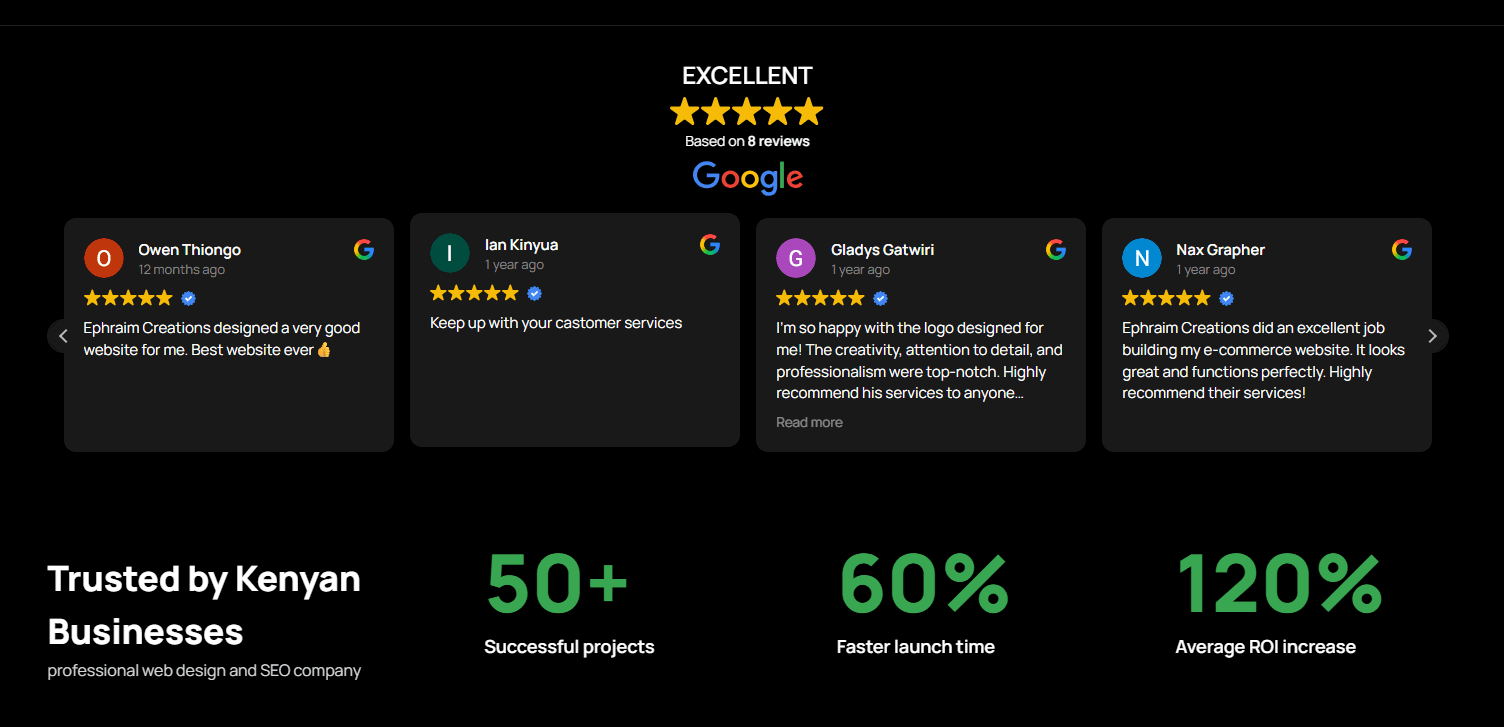
Instead of creating fictional testimonials, our website displays live reviews directly from our Google Business Profile using a WordPress plugin.

Every review shown on our website includes real customer information, star ratings, review dates, and authentic feedback from businesses and clients we’ve worked with.

Because the reviews are synced automatically, any new review published on Google appears on our website without manual editing.

This means visitors always see genuine, up to date customer experiences.

It’s a simple change that adds credibility and reinforces the trust we’ve built with our clients.

If you’re looking to build stronger trust with your own website visitors, this is one of the most effective improvements you can make.

Want verified Google reviews on your website? Ephraim Creations can help you connect your Google Business Profile and display live customer reviews that strengthen your online credibility.

How to Add Verified Google Reviews to Your WordPress Website

If you’re using WordPress, integrating verified Google reviews is easier than many business owners expect.

The process typically involves:

  • Verifying your Google Business Profile.
  • Installing a trusted Google Reviews plugin.
  • Connecting your Google Business Profile to the plugin.
  • Customizing the review layout to match your website’s branding.
  • Displaying the review section on key pages such as your homepage, service pages, or contact page.

A professionally designed review section should look like a natural part of your website while maintaining the authenticity of each review.

The goal isn’t just to display stars. It’s to showcase real customer experiences that help visitors make confident decisions.

Final Thoughts

Your website should do more than look professional. It should inspire confidence.

While generic testimonials may still have a place, verified Google reviews provide a level of transparency that today’s customers expect. They demonstrate that your business has real clients, real feedback, and a reputation that can be independently verified.

If you’re serious about building trust, improving credibility, and increasing conversions, adding verified Google reviews to your website is a worthwhile investment.

At Ephraim Creations, we help businesses integrate live Google reviews into their websites using professional WordPress solutions that match their brand and update automatically.

Ready to build more trust with your website? Get verified Google reviews on your website today and let your satisfied customers become your strongest marketing asset.

Contact Us!

Newsletter Updates

Enter your email address below and subscribe to our newsletter

Leave a Reply

Your email address will not be published. Required fields are marked *